Introduction
In the first article, we built a modern CI pipeline to lint, build, and preview a Hugo site using GitHub Actions. Now, we’ll take a step forwardin the DevSecOps direction.
Indeed, traditional pipelines often focus on code quality and deployment readiness. However, that’s no longer enough. A single missing HTTP header or exposed debug page could compromise your entire application. And in enterprise-grade CI/CD pipelines, security testing isn’t an afterthought, it’s a gate.
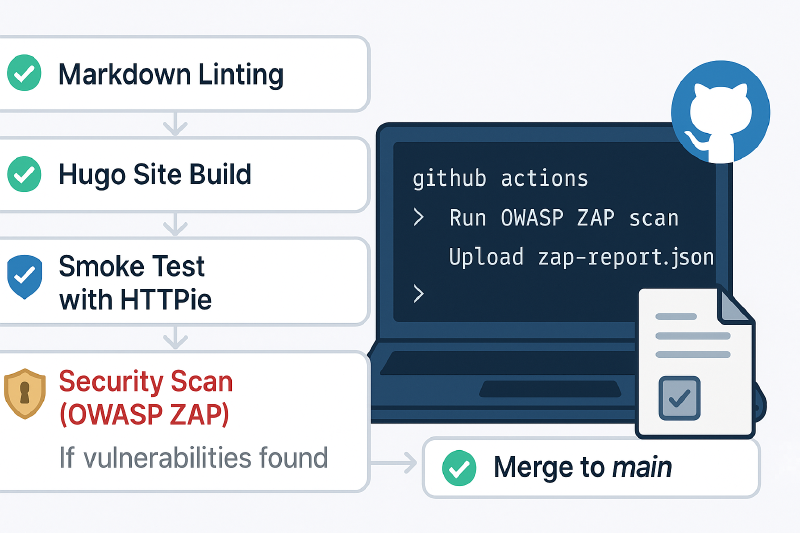
That’s why in this second article, we’ll introduce Automated Dynamic Security Testing (DAST) using OWASP ZAP and demonstrate how to integrate it into our GitHub Actions pipeline before merging changes into main. By automating the scan of a live preview of our Hugo site each time a pull request is made, we:
-
Detect runtime security issues (unlike SAST which only scans code)
-
Prevent risky code from reaching production
-
Establish a habit of security-first development
-
simulate a real-world DevSecOps enforcement layer used in production environments
If high-severity vulnerabilities or missing security headers are detected, the merge is blocked automatically, just like it would be in an enterprise CI/CD setup.
This enhancement helps enforce security compliance early and automatically, aligning with the core DevSecOps principle of shifting security left.
As said before, this article continues from our previous guide on setting up a CI pipeline with GitHub Actions for a Hugo site. Make sure your initial pipeline is in place before proceeding. No additional installation of ZAP is required for this setup.
🔒 Security Checks Enforced
Here’s what the new security check does:
| Check Type | Description |
|---|---|
| High Severity Threshold | Blocks the merge if the ZAP scan finds any vulnerability with a severity score of 7.0 or higher |
| Security Headers Check | Verifies the presence of essential HTTP headers like Strict-Transport-Security andX-Content-Type-Options |
| No debug or Sensitive Information | Ensure the page does not expose stack traces, debug messages, or server metadata that could aid attackers |
All checks run automatically after a live preview of the Hugo site is built inside a container. If anything fails, the pipeline halts, protecting main from risky changes.
Alerting and Reporting Features
To simulate a more complete DevSecOps setup:
| Feature | Description |
|---|---|
| Upload ZAP Scan Report | Automatically saves the full ZAP scan report (.html or .json) as a GitHub Actions artifact. Your team can download and review it directly from the UI. |
| Auto-create GitHub Issues | When allow_issue_writing: true is enabled in the ZAP GitHub Action, issues are automatically opened or updated with the vulnerability findings. This lets you track and manage security issues just like technical debt, in your existing GitHub backlog. |
These features allow your team to stay informed, track vulnerabilities over time, and ensure no security warning goes unnoticed — even after a successful build.
❗ Note that GitHub doesn’t allow Actions to create issues unless:
- The GitHub token has proper permissions, AND
- It’s not running from a fork or GitHub Actions from a PR created by a fork (for security reasons).
For that reason, we’re going to leave this to
falsevalue here to avoid risk and complexity.
Integrating OWASP ZAP into GitHub Actions
We’ll add a new job in our ci.yml workflow after the smoke test, using zaproxy/action-full-scan to scan the live Hugo site.
|
|
-
needs: http-smoke-test- Ensures this job runs only after Hugo is built and successfully served/tested by the previous job.
- Reuses the output (
/public) from the Hugo build
-
docker run -v $(pwd)/public:/usr/share/nginx/html nginx- Serves the static Hugo site at
http://localhost:8080using Nginx. - This mimics a real server environment for ZAP to scan.
- Serves the static Hugo site at
-
zaproxy/action-full-scan@v0.10.0- Launches a full DAST scan with the ZAP CLI against the preview site.
fail_action: trueensures the job fails if critical issues (e.g., severity ≥ WARN) are found.cmd_options:-a: aggressive scan mode-j zap-report.json: generate a JSON report-r zap-report.html: generate a HTML report-l WARN: sets minimum alert level to WARN
-
upload-artifact- Saves the ZAP scan report as a downloadable artifact in GitHub Actions
- JSON is for automation (issue creation, pipelines)
- HTML is for humans to browse the full report
- Useful for auditing, debugging, or sharing with the team.
- Saves the ZAP scan report as a downloadable artifact in GitHub Actions
-
allow_issue_writing: true- Auto-create GitHub Issues on Vulnerabilities
⚠️ Also don’t forget to add
owasp-zapjob in the following line of yourauto-mergejob:
1needs: [lint-markdown, hugo-preview, http-smoke-test, owasp-zap]
Final Pipeline Overview
Here’s what your complete DevSecOps-enhanced CI pipeline now looks like:
-
Markdown Linting
-
Hugo Preview Build in Container
-
HTTPie Smoke Test (via local server)
-
OWASP ZAP Security Scan
-
Auto-Merge if All Stages Pass
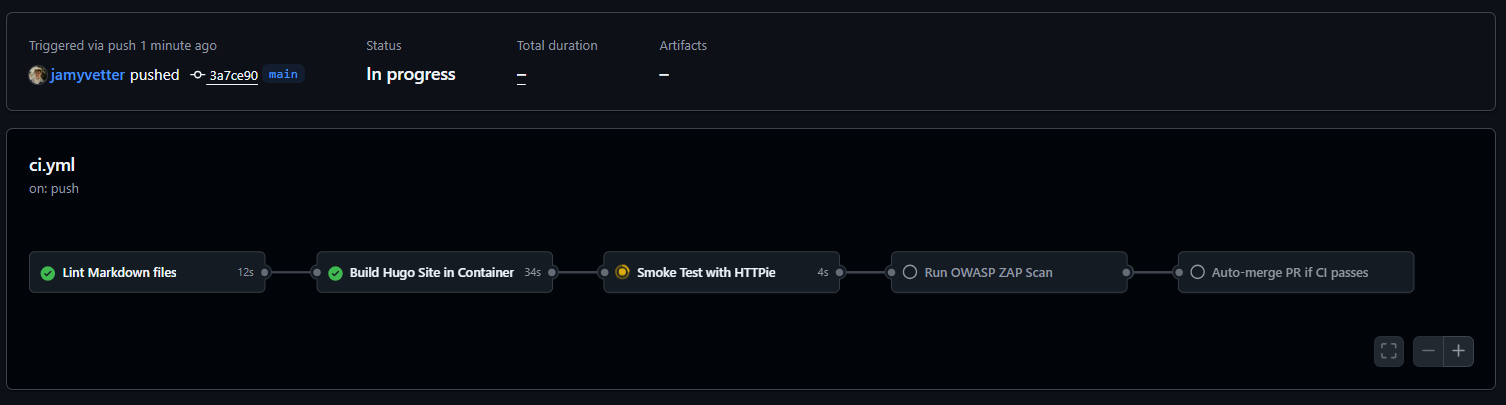
CI pipeline New Final Look
How to test
To trigger the full pipeline, simply add a modification in a feature branch then commit and push:
|
|
Then just open a Pull Request into main. GitHub Actions will run all stages, including OWASP ZAP, and block the merge if critical issues are found.
Conclusion
I really encourage you to try integrating OWASP ZAP into your CI pipeline. It’s surprisingly simple to automate and adds a strong layer of defense to your workflow.
By catching high-severity vulnerabilities before code reaches production, you bring your pipeline closer to what real-world security gates look like in enterprise environments.
Thanks for following along! I hope this helps make your DevOps pipeline not just smarter, but safer.